
xGanjaFarmer
Member
Hey everybody, I found this awesome tutorial over on grasscity on how to wire a regular pc fan to any 12v adaptor. This was written by MushuHappiness, thanks man! 
Hello Ladies and Gentleman, Mushu here. After seeing how practically everyone doing Micro grows or even Cab grows likes to use PC/Axial fans to Ventilate/Cool their grows, thought I'd post this little "How To" to connect your PC/Axial fans to a 12v DC Adapter.
Purpose/Use: For everyone that is always concerned about how to cool their Micro/Cab grows by using PC/Axial fans but was unsure of how to power these awesome puppies. No longer will you need a PC Power Supply(PSU) or have to buy AC axial fans that cost $10-$20
Sorry if pictures are not up to everyones specs, they were taken using a camera phone :headbange
Lets get started!
First off... You'll need a 12v AC to DC power adapter. You can buy these at almost any place that carries electronics. You will need to figure out how many Amps you will need based on the types of fans you plan on using. Most PC/Axial fans draw less than .35A(350 miliAmps), and I have yet to see one that draws more than .3 in actuality. For 2 or more fans(again, depending on the amps being drawn) You will want one that has an output of 1000+mAs(or 1.0 Amp)
You can also find adjustable AC/DC adapters to select the voltage to use for your fans to quiet them down, great for use during the lights off hours to keep air moving quietly through your grow space. Not recommended to go below 6Vs for your fans. Adjustable AC/DC adapters should be used in a parallel wiring setup.
PLEASE NOTE: When wiring your fans, try and use the same exact same fans. Use one adapter for 120mm, another for 80mms, and so on. Also, the way I have mine wired are paralleled, meaning they're both hooked up at the same connection to get the full 12v(FanxFan -2-Adapter). If you want to use a "chain",meaning, one fan is wired to another fan, and then that fan is connected to the adapter... Fan-2-Fan-2-adapter, the voltage on each fan will be cut in half. Remember this as you decide how much air you want to move, or if your fans become too loud. To chain fans, your fans MUST be the same otherwise they will not function properly and could cause problems.
Mine that I am using is a very old one I had lying around from somewhere.. I think it was used to power a Ethernet hub.. im not sure.
Specs:
Input: 120VAC 60HZ 24W
Output: 12VDC 1.2A

-------------------------------
Next: You want to have One or more PC/Axial fans(The purpose of this "How To" :bashhead: ). You can find these at www.newegg.com, www.xoxide.com, www.tigerdirect.com, or at your local electronics store.
I'm using 2 80mm fans that I pulled from old computers. They push around 35-40CFMs a piece and are silent over my ceiling fan(I have to put my ear real close to even hear them). You will have a hard time hearing PC/Axial fans unless the DBA is above about 35-40dba.

-------------------------------
Next: Cut the connectors off both your PC/Axial fans so that your only left with the actual wires. You may need to split the wires apart if they are connected together. Then Strip all wires so there is enough room to connect them all together.
Also, on MOST DC Adapters, the wires will have some sort of indicator on the wires so you can tell White from Black... On this one, there is a white indicator that runs the length of the wire, this is your white, the other one is your black. Do NOT cross these two wires.

-------------------------------
Next: Take both Black wires of the PC/Axial fans(They are almost ALWAYS color coded, have to see some that are not). And either use electrical tape or shrinkwrap to connect them together. Do the same for the Red(or White) Wires.
DO NOT LET THE BLACK AND RED WIRES TOUCH!!!!!! :bashhead: :bashhead: :bashhead:

-------------------------------
Next:
1. Connect your Red PC/Axial wires to the Adapters WHITE wire.
2. Connect your Black PC/Axial wires to the Adapters BLACK wire.
-------------------------------
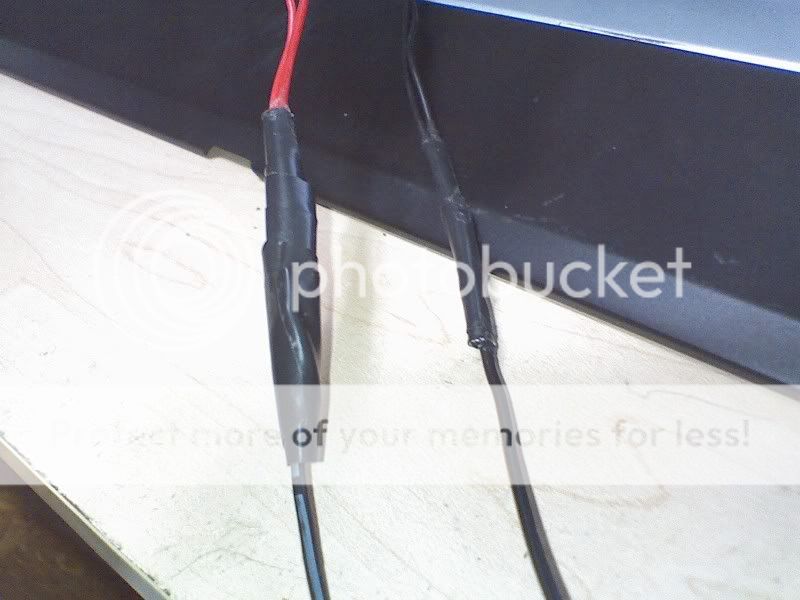
Thats it! Make sure you use Electrical tape, or Shrinkwrap(Best choice I think, but i did not have any on hand, so i taped the heck out of em
 )
)
Your finish product should look like this....

And after you plug it in?

Viola!! Working PC/Axial fans that can be plugged safely into a wall outlet or powerstrip for your ease of use
Enjoy Guys! And keep on Tokin an Growin :rasta:
Hello Ladies and Gentleman, Mushu here. After seeing how practically everyone doing Micro grows or even Cab grows likes to use PC/Axial fans to Ventilate/Cool their grows, thought I'd post this little "How To" to connect your PC/Axial fans to a 12v DC Adapter.
Purpose/Use: For everyone that is always concerned about how to cool their Micro/Cab grows by using PC/Axial fans but was unsure of how to power these awesome puppies. No longer will you need a PC Power Supply(PSU) or have to buy AC axial fans that cost $10-$20
Sorry if pictures are not up to everyones specs, they were taken using a camera phone :headbange
Lets get started!
First off... You'll need a 12v AC to DC power adapter. You can buy these at almost any place that carries electronics. You will need to figure out how many Amps you will need based on the types of fans you plan on using. Most PC/Axial fans draw less than .35A(350 miliAmps), and I have yet to see one that draws more than .3 in actuality. For 2 or more fans(again, depending on the amps being drawn) You will want one that has an output of 1000+mAs(or 1.0 Amp)
You can also find adjustable AC/DC adapters to select the voltage to use for your fans to quiet them down, great for use during the lights off hours to keep air moving quietly through your grow space. Not recommended to go below 6Vs for your fans. Adjustable AC/DC adapters should be used in a parallel wiring setup.
PLEASE NOTE: When wiring your fans, try and use the same exact same fans. Use one adapter for 120mm, another for 80mms, and so on. Also, the way I have mine wired are paralleled, meaning they're both hooked up at the same connection to get the full 12v(FanxFan -2-Adapter). If you want to use a "chain",meaning, one fan is wired to another fan, and then that fan is connected to the adapter... Fan-2-Fan-2-adapter, the voltage on each fan will be cut in half. Remember this as you decide how much air you want to move, or if your fans become too loud. To chain fans, your fans MUST be the same otherwise they will not function properly and could cause problems.
Mine that I am using is a very old one I had lying around from somewhere.. I think it was used to power a Ethernet hub.. im not sure.
Specs:
Input: 120VAC 60HZ 24W
Output: 12VDC 1.2A
-------------------------------
Next: You want to have One or more PC/Axial fans(The purpose of this "How To" :bashhead: ). You can find these at www.newegg.com, www.xoxide.com, www.tigerdirect.com, or at your local electronics store.
I'm using 2 80mm fans that I pulled from old computers. They push around 35-40CFMs a piece and are silent over my ceiling fan(I have to put my ear real close to even hear them). You will have a hard time hearing PC/Axial fans unless the DBA is above about 35-40dba.
-------------------------------
Next: Cut the connectors off both your PC/Axial fans so that your only left with the actual wires. You may need to split the wires apart if they are connected together. Then Strip all wires so there is enough room to connect them all together.
Also, on MOST DC Adapters, the wires will have some sort of indicator on the wires so you can tell White from Black... On this one, there is a white indicator that runs the length of the wire, this is your white, the other one is your black. Do NOT cross these two wires.
-------------------------------
Next: Take both Black wires of the PC/Axial fans(They are almost ALWAYS color coded, have to see some that are not). And either use electrical tape or shrinkwrap to connect them together. Do the same for the Red(or White) Wires.
DO NOT LET THE BLACK AND RED WIRES TOUCH!!!!!! :bashhead: :bashhead: :bashhead:
-------------------------------
Next:
1. Connect your Red PC/Axial wires to the Adapters WHITE wire.
2. Connect your Black PC/Axial wires to the Adapters BLACK wire.
-------------------------------
Thats it! Make sure you use Electrical tape, or Shrinkwrap(Best choice I think, but i did not have any on hand, so i taped the heck out of em
Your finish product should look like this....
And after you plug it in?
Viola!! Working PC/Axial fans that can be plugged safely into a wall outlet or powerstrip for your ease of use
Enjoy Guys! And keep on Tokin an Growin :rasta:


 much appreciated.